AI image creation can feel confusing at first. There are new terms, many tools, different models and a lot of advice online that does not always agree. If you are a complete beginner, it is normal to wonder where to start, what to pay for and how to avoid wasting time.
This beginner-friendly guide answers the most common questions people ask before using OpenArt AI . We will explain what the platform does, how to create your first images, how to improve your results and how to use your creations safely and responsibly.
What Is OpenArt AI and What Can You Do with It?
OpenArt AI is an online platform for creating images and short videos with artificial intelligence. You describe what you want in plain text, and the system generates visuals based on your description. It also offers tools for editing, upscaling and animating your creations.
People use it for many purposes: blog images, social media posts, character designs, product mockups, wallpapers, book covers, presentations and creative experiments. You do not need to know how to draw or use complicated design software.
The main idea is simple. You bring the idea, and the platform helps turn it into a visual in a matter of seconds.
Do I Need Any Design or Technical Skills?
No. The platform is built so that beginners can start right away. If you can describe a picture in a sentence, you can create an AI image. The skill you will develop over time is writing better prompts, and that comes naturally with practice.
Basic design knowledge can help, such as understanding colors, composition and lighting, but it is not required. Many successful creators started with zero experience and simply learned by testing, comparing and improving.
How Do I Create My First Image?
The process is straightforward. Create an account, open the image creation tool, choose a model, type your prompt and generate. After a few seconds you will see your results and can save, download or refine them.
For your first try, use a simple prompt with one subject, one setting and one mood. For example: a cozy reading corner with a warm lamp, soft blanket and rainy window, calm atmosphere, realistic photography.
Do not expect perfection on the first attempt. Treat it as an experiment. Generate a few versions, see what works and adjust your words step by step.
What Is a Prompt and How Do I Write a Good One?
A prompt is the text description you give to the AI. It tells the system what to create. The clearer your prompt, the closer the result will be to your idea.
A good beginner formula is: subject, setting, style, lighting, mood. For example: a red fox in a snowy forest, digital illustration, soft morning light, peaceful mood. Each part adds useful information without making the sentence too long.
Avoid very short prompts like cool picture or nice landscape, since they give the AI too little direction. Also avoid contradictions, such as asking for a realistic photo and a cartoon at the same time.
Why Do My Results Not Look Like What I Imagined?
This is the most common frustration for beginners, and it usually has simple causes. The prompt may be too vague, too crowded or missing a style. The chosen model may also not fit the type of image you want.
Try changing one thing at a time. Add a style word, simplify the scene or switch to a different model. Comparing results after each small change helps you understand what actually makes a difference.
Remember that AI interprets words in its own way. Sometimes the best approach is to describe the visual result you want instead of the concept behind it.
What Are Models and Which One Should I Choose?
A model is the AI engine that creates the image. Different models have different strengths. Some are excellent for realistic photography, others for anime, fantasy art, illustration or 3D style visuals.
If you are unsure, test the same prompt on two or three models and compare the results. This is the fastest way to learn what each model does best. After a while, you will naturally know which one to pick for each type of project.
Keep notes about your favorites. A simple list of which model works best for which style will save you a lot of time later.
Can I Edit an Image After It Is Generated?
Yes. Editing is a major part of a good workflow. You can fix small problems, change a background, remove unwanted objects or adjust specific areas without recreating the whole image.
Upscaling is another useful tool. It increases the resolution of an image so it looks sharper on large screens or in print. This is especially helpful for banners, posters and website hero images.
A practical routine is to generate several options, choose the best, fix small flaws and upscale only the final version.
Can I Create Videos or Only Images?
Beyond still images, the platform also supports turning images into short animated clips. You can add gentle motion, such as moving clouds, floating particles or subtle camera movement, to make your content more dynamic.
This is popular for social media posts, intros, website banners and promotional content. Start with a clean image that has a clear subject, since simple visuals usually create smoother and more natural animation.
How Do Credits Work?
Most AI platforms use a credit system. Each action, such as generating an image, upscaling or creating a video, uses a certain amount of credits. More advanced actions typically cost more than simple ones.
To use credits wisely, start with quick, low-cost drafts to test your idea. Only use higher quality settings for the final image you really plan to use. This simple habit can stretch your credits much further.
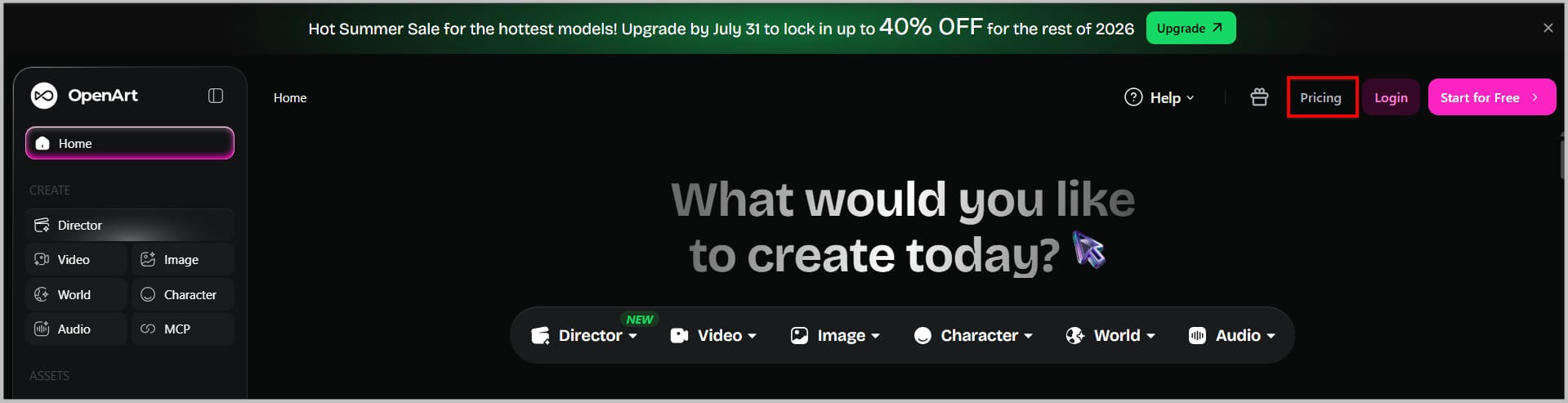
Since plans, features and pricing can change, always check the latest details on OpenArt AI before choosing a plan.
Which Plan Is Right for Me?
It depends on how often you create. If you are only exploring or making a few images for fun, a free or lighter option may be enough. If you create content weekly, run a blog or work with clients, a paid plan usually gives better value and more flexibility.
Think about your real needs. How many images do you need per month? Will you create videos? Do you need commercial use? Answering these questions before subscribing helps you avoid paying for more than you need.
Can I Use AI Images Commercially?
This is an important question, and the answer depends on the platform's terms and your plan. Rules about commercial use can differ, so you should always read the official terms before using generated images for business, client work or products you plan to sell.
Even when commercial use is allowed, you should still use common sense. Avoid copying protected characters, logos or brand designs, and do not create images that could mislead people or infringe on someone else's rights.
If you work with clients, it is a good idea to explain that AI is part of your process, so everyone has clear expectations.
Is It Okay to Use Real People or Famous Styles?
Be careful here. Using a real person's face without permission can cause legal and ethical problems. It is safer to create fictional characters or use your own photos with consent.
When it comes to artistic styles, drawing general inspiration from a type of art, such as watercolor or retro poster design, is fine. Trying to imitate a specific living artist's exact style for commercial purposes is risky and can harm both your reputation and the original creator.
How Can I Keep My Images Consistent?
Consistency makes your content look professional. Choose a visual style and reuse a short style phrase in every prompt. For example: soft pastel colors, minimalist illustration, clean background.
If you want the same character to appear in many images, use reference images and the character consistency tools available on the platform. Start with a clear reference set using a simple background and good lighting.
What Mistakes Should Beginners Avoid?
The first mistake is writing prompts that are too vague or too complicated. The second is giving up after one or two attempts. Great AI images usually come from several rounds of testing and refining.
Another common mistake is publishing without checking details. Always zoom in to look for distorted hands, strange shapes or unreadable text. Finally, avoid changing your style too often if you are building a brand or a blog.
How Can I Improve Faster?
Practice a little every day. Even ten minutes of experimenting will teach you more than reading long guides. Save your best prompts, compare models and study what makes your favorite results work.
Browse the community gallery for inspiration, but always add your own twist. Learning from others is great, as long as your final work stays original.
Conclusion: Your Creative Journey Starts Now
AI art is not complicated once you understand the basics. With clear prompts, a bit of patience and a simple workflow, anyone can create beautiful visuals for blogs, social media, stores and personal projects.
If you are ready to begin, platforms like OpenArt AI offer an easy and flexible way to start. Try a simple prompt today, learn from each result and keep improving. Your first great image may be only a few minutes away.